Turn Bambu Studio, Orca Slicer and PrusaSlicer 3MF projects into clean STL files. Pick the objects you need and export them together or one by one. Your file never leaves your device.
Nothing uploaded
Multi-object & multi-plate
Modifiers left out automatically
Free, no sign-up
3MFSTL
Runs on your device
Release to open the file
How it works
How to convert 3MF to STL
01
Drop your 3MF file
Drag a .3mf project from Bambu Studio, Orca Slicer, PrusaSlicer, Cura or a model download onto the converter, or click to choose it. Nothing is uploaded.
02
Choose objects and parts
Every object and part is listed with its filament colour. Untick what you don't need; modifiers and negative volumes are already left out.
03
Download the STL
Export one STL, one per object or one per part (as a ZIP). Binary STL is the smallest; choose ASCII only if an older tool needs it.
Actual sample project
Inspect the project before exporting
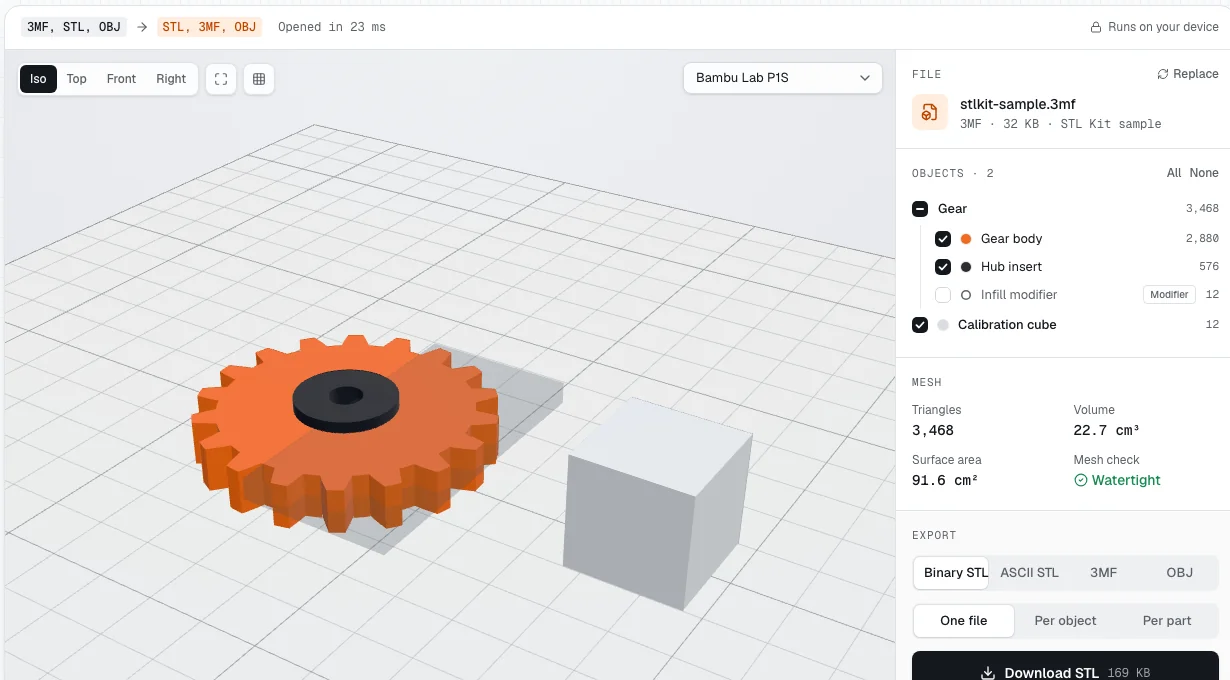
The bundled 3MF sample contains a two-part gear, a calibration cube and an infill modifier. The converter shows the real object list, part colors, mesh statistics and export options before you download.
Unmodified capture of the bundled sample loaded in STL Kit. The infill modifier is excluded from export by default.
Common uses
When should you convert 3MF to STL?
Convert 3MF to STL when you need model surfaces without the slicer project. The result is easier to exchange with geometry tools, but units, colours and print settings need separate handling.
Edit the mesh in another program
Mesh editors and CAD tools often accept STL even when they cannot open a slicer project. Convert the project to repair a boundary, remix a downloaded model, or use the shape as a reference. The result is triangle geometry, not a parametric CAD history.
Share a broadly compatible model
STL is useful when the recipient does not use Bambu Studio, Orca or another slicer. The converted file contains just the triangles needed by most 3D tools. Tell the recipient the unit is millimetres, because STL does not record it.
Extract one object from a project
Downloaded projects may contain several models or plates. Select only the object you need instead of rebuilding the layout. The 3MF to STL converter can save that selection as one mesh or export every object separately.
Prepare multicolour parts
STL cannot carry filament assignments, but a colour-painted project is still useful. Export one STL per part so each colour remains a separate mesh. You can then assign filaments in your slicer and align the parts using their shared project coordinates.
Why this converter
Made for slicer projects, not just simple 3MF files
A 3MF saved by a slicer is a project: several files, assemblies, helper volumes and settings. STL Kit reads it the way your slicer does.
Private by design
The conversion runs entirely in your browser. Files are never uploaded, so client parts and unreleased designs stay on your device.
Every object, every plate
Multi-part assemblies, objects stored in separate model files and multi-plate projects are all read and placed where your slicer put them.
Modifiers stay out
Modifiers, negative volumes and support blockers change slicer settings, not the print. They're left out of the STL unless you tick them.
Keep colours separable
STL has no colour. Export one STL per part and each filament colour becomes its own file, ready to recombine in another slicer.
Correct size every time
3MF units (micron, mm, cm, inch) are converted to millimetres, and the rotation, mirroring and positions from the project are applied.
Mesh check included
See the triangle count, volume, surface area and whether each part is watertight before you download.
3MF vs STL
What changes when you convert 3MF to STL
STL stores only triangles. Everything else in a 3MF project is dropped, which is exactly why STL opens in every 3D tool.
Stored in the file
3MF
STL
Triangle mesh geometry
Units
Declared (mm, inch…)
None, mm assumed
Several named objects
One mesh per file
Colours and materials
Print settings and plates
Opens in every slicer and CAD app
Most current slicers
File size
Small (zip compressed)
Larger
Troubleshooting
Common 3MF to STL problems and fixes
Most 3MF to STL issues come from project data that STL cannot represent, rather than broken geometry. Check the object list, dimensions and export mode before slicing the downloaded file.
An object or helper volume is missing
Modifiers, negative volumes and support blockers are excluded by default because they control slicing rather than form the model. Review the object list on every plate. Tick a helper volume only when you intentionally want its shape in the 3MF to STL output.
The exported model looks too large or small
STL Kit reads the units declared by 3MF and writes millimetres. If the size still differs, check the source project's scale and the destination tool's import units. Do not apply a second inch-to-millimetre conversion to an STL that is already in millimetres.
Colours disappear after conversion
This is a format limitation, not a failed conversion. STL has no standard colour or material fields. Export per part and keep the original 3MF as the reference for filament assignments. Textures and UV maps are likewise not carried into an STL mesh.
Printer settings or G-code are not included
STL is geometry only. Even when a sliced 3MF contains G-code, the converter reads the model and ignores machine instructions. Slice the STL again with your own printer, material, quality and support settings instead of using settings made for another machine.
Other ways
Exporting STL from your slicer instead
If the slicer is already open, you can export STL there. Use STL Kit when you don't have the app, or want per-object files quickly.
Bambu Studio and Orca Slicer
Open the project and select the objects or plates you need. Use File → Export, then choose one combined STL or separate STLs when that option is available. Combined export is convenient for an assembly; separate files work better for individual editing or colour assignments.
PrusaSlicer
Open the 3MF and choose File → Export → Export Plate as STL. Everything on the current plate is saved as one STL, so switch plates or remove unwanted objects first. For separate parts, use the object list and export options in your installed version.
No slicer installed?
Downloaded a 3MF from MakerWorld or Printables for a different printer? Drop it into the converter above. There's nothing to install. You can inspect every plate, exclude helper volumes and save selected objects without changing the original project.
Yes. There's no sign-up, no watermark and no daily limit. Files up to 100 MB are supported; the real limit is your device's memory.
Are my 3MF files uploaded?
No. The 3MF is unpacked and converted inside your browser tab. Nothing is sent to a server, so it's safe for confidential parts, and it keeps working offline once the page has loaded.
Does it work with Bambu Studio and Orca Slicer 3MF files?
Yes. STL Kit reads Bambu Studio and Orca projects, including objects stored in separate model files, part names, filament colours and plates. PrusaSlicer and Cura 3MF files work too.
Will the STL keep my colours?
No. The STL format can't store colour or material. To keep a multicolour model usable, export one STL per part; each file then matches one filament.
Why are some parts unticked?
Those are modifiers, negative volumes or support blockers. Slicers use them to change settings in a region; they aren't part of the printed shape, so they're left out of the STL unless you tick them.
Can I convert just one object from a multi-object 3MF?
Yes. Untick the objects you don't need, or choose Per object to download every object as its own STL in a ZIP file.
Binary or ASCII STL: which should I choose?
Binary. Both hold the same triangles, but binary STL is about five times smaller and is what slicers expect. ASCII STL is plain text, useful only for a few older tools.
Will the STL be the right size?
Yes. 3MF files declare their unit, and STL Kit converts everything to millimetres, the unit slicers assume for STL. Rotation, mirroring and scaling set in the project are applied too.
Can I convert STL back to 3MF?
Yes. Use the STL Converter on the home page: drop an STL and download it as 3MF, OBJ or STL.
Can you convert 3MF to STL without installing a slicer?
Yes. Drop the file into the converter above and download the selected objects as STL. Everything runs in your browser, so there is no software to install and no account to create. You can also open the sample project first to see how object selection works.